Fusebox 4+ Example Security Code
See more fusebox code at www.toshop.com
The following code is not a complete application but an example of how you can setup a flexible security solution for your fusebox applications.
Download the code
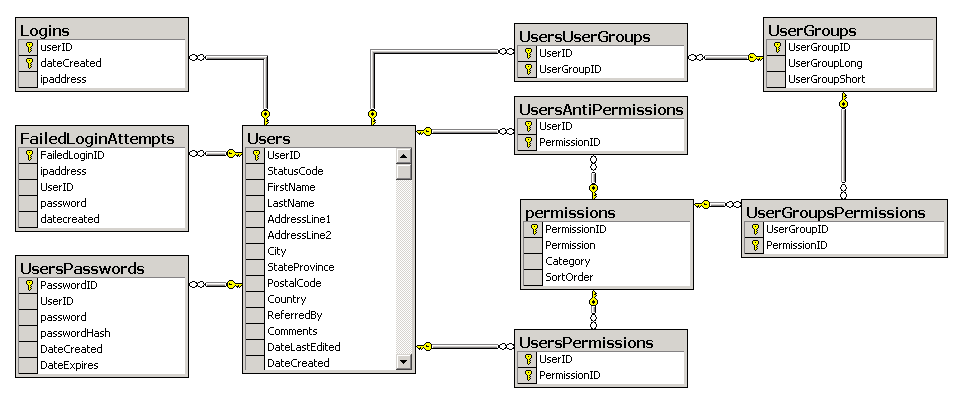
The database schema
Concept and Usage
Permissions are like keys to a lock. If you have the permission, you are granted access to
the resource. Users can get permissions two ways. One is by directly assigning a permission
to the user. The second is through group membership. Anti-permissions are applied after
the combined permissions are calculated and remove a permission from a user regardless of how
they may have been given it. For example, you may give a "sys admin" group permission to
delete a user. If you have a user in the "sys admin" group but they are new, you may wish to
remove that ability for them to delete a user. Add the "delete user" permission to the user's
anti-permissions. They will maintain group membership in "sys admin" but not be able to
delete users.
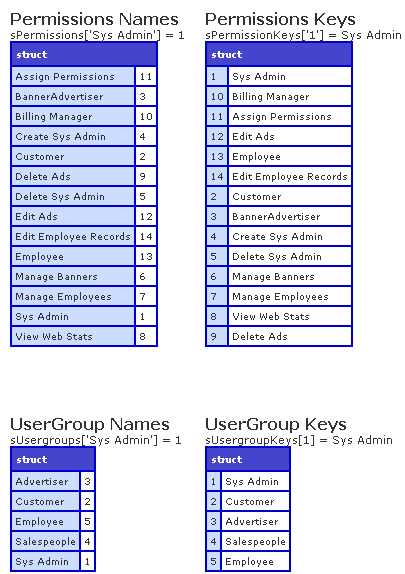
Permissions are stored in the database as a number/string pair. The numbering associated with each permission is irrelevant if you use the permission structure to find the right permission as the structure is built in real time. This means you can freely change the numbering in the database and know it won't break your application. Just follow this format: sPermissions['Permission Name'] in your code versus using the actual number in the database.
The session.user.myPermissions
variable holds a list of the numbers associated with allowed permissions, not the text of what each
permission is. For example:
session.user.myPermissions = 1,3,5,9,12,15
You can change this variable but be sure to update the ListBasedSecurity.cfm file
in your /plugins directory if you do. Because the permissions are stored in memory as a list of integers, it is small and fast. The number of permissions you use can be large.
Permissions are the keys to let your users into entire circuits, fuseactions or page elements.
To restrict an entire circuit to a specific permission, modify your circuit.xml like this:
<circuit access="public" permissions="#evaluate(sPermissions['Sys Admin'])#">
... protected fuseactions...
</circuit>
This would protect all fuseactions in this circuit. Make sure you add a check to make sure the
user is logged in.
To restrict access for an individual fuse, do something like this:
<fuseaction name="editUser" permissions="#evaluate(sPermissions['Edit Employee Records'])#">
.. Protected Fuseaction ...
</fuseaction>
This would limit the ability to the "editUser" fuseaction to only those people with "Edit Employee Records"
permission.
To restrict part of your page based on permissions, use a CFIF test like this:
<cfif listfind(session.user.permissions, sPermissions['Delete User']) GT 0>
DISPLAY PROTECTED CONTENT
<cfelse>
DO NOT DISPLAY PROTECTED CONTENT
</cfif>
This would validate if you are have "Delete User" permission. If you do, show the protected content.
|